
Setting prices saves them. Publishing is what puts them in front of a customer. Until you publish, checkout keeps showing whatever it showed before — old prices, or none.
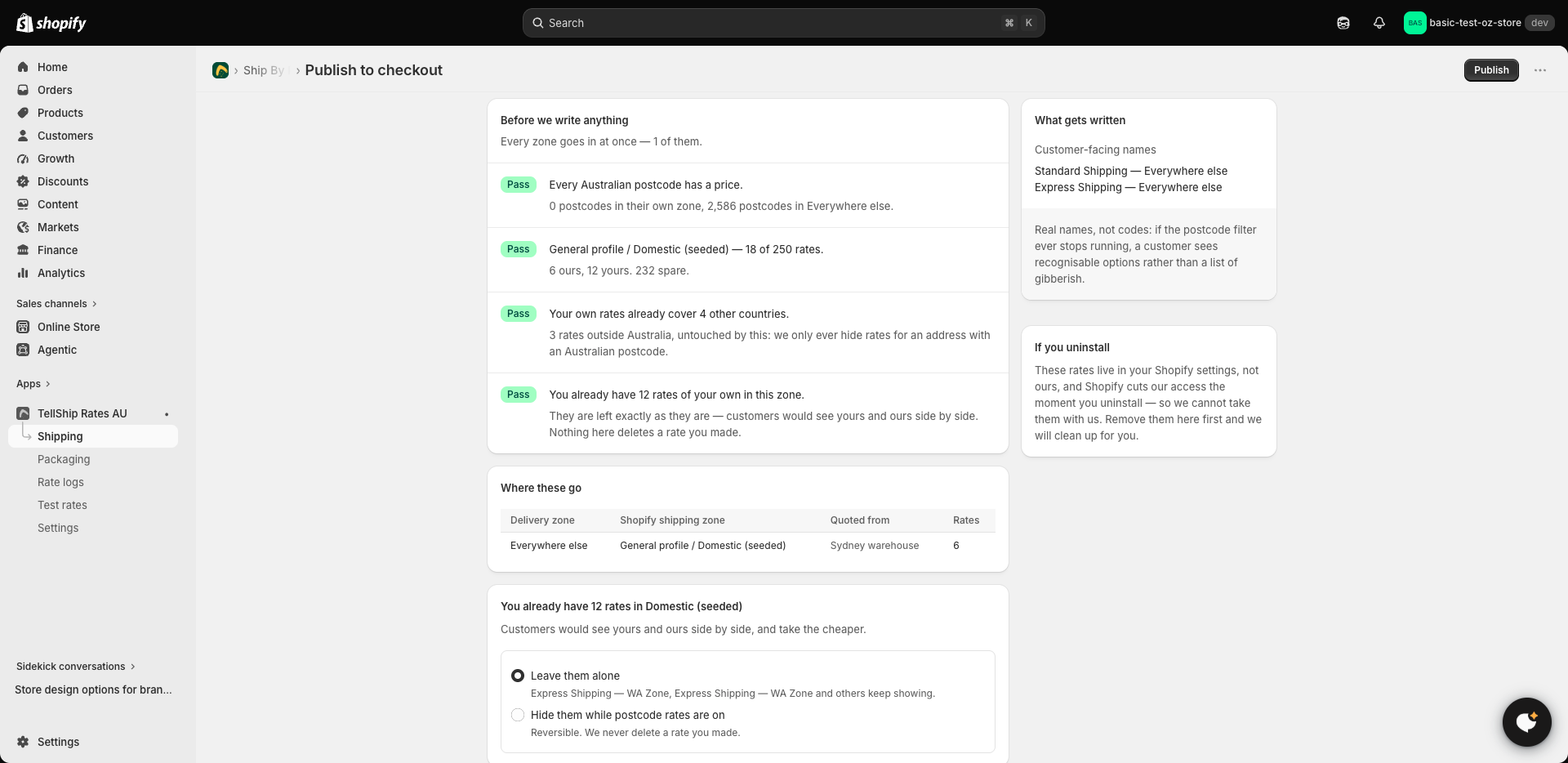
Where
Shipping → your carrier → Publish to checkout. The page shows you exactly what is about to be written before it writes anything.
What publishing does
Your prices are written into your Shopify shipping settings as ordinary rates — which is why they work on every Shopify plan, with no carrier-calculated shipping needed. Publishing only touches the rates TellShip put there; nothing else in your shipping settings is disturbed.
When to publish
After anything you want customers to feel: a new zone, edited prices, a refill from Australia Post, a new weight band. Change, publish, done — there is no schedule to wait for.
Checking it worked
Run a quote on Test rates (in the app's menu) — it prices a parcel the way checkout does. See Testing your rates. And if checkout still shows old numbers, start a fresh cart: a checkout that was already open can hold the rates it was given.